All sources are fictional and all images are original. The one-page A4 SVGs have titles/descriptions; PDFs have selectable text but are untagged. This file supplies the exact source facts and pictorial geometry in reading order. An educator can read aloud, sign, use AAC, draw broad raised shapes or have a child direct whole-page cards. Colour is never the only category cue. Physical object representation still needs four large safe real tokens; these pages and any on-screen token are pictures.
1. Paper Maker Cart source · PDF
Title: “Paper Maker Cart source.” Subtitle: “Four original prop pictures in a fictional list.” Across the upright page, four large numbered rectangles read left to right: 1 PANEL, an outlined large square containing a smaller outlined square, symbol P; 2 TUBE, an upright cylinder with curved oval top, symbol T; 3 PANEL, the same nested-square silhouette, symbol P; 4 BLOCK, a rectangular body with sloping top edge, symbol B. Lower panel states “Source order: PANEL, TUBE, PANEL, BLOCK” and “Symbol row: P T P B.” It says the pictures are drawn paper props, not real data, and asks for broad physical tokens for the object form. Tactile route: four broad left-to-right numbered fields; make/trace nested square, cylinder outline, nested square, solid rectangle with top edge. Name each before matching P/T/P/B.
2. Find the copy mismatch · PDF
Title: “Find the copy mismatch.” Subtitle: “Source P T P B; puppet copy P T B B.” Top sentence: “Two rows are printed; compare position by position.” First broad horizontal row is SOURCE · P T P B, with four large outlined letter boxes. Second row is PUPPET COPY · P T B B, also four letter boxes. Bottom: “Which position differs? Point to the source first. A copy check does not observe a real prop or device.” Tactile route: two broad rows of four spaces, source above copy, read each pair vertically. Source third P differs from copy third B; changing copy third to P yields P T P B. This is worked practice, not a held check.
3. Four-entry three-way mat · PDF
Title: “Four-entry three-way mat.” Subtitle: “Blank object, picture and symbol rows.” Intro: “Place four broad physical tokens in the OBJECT row.” Three stacked broad rows each have four numbered blank spaces: OBJECT · PHYSICAL TOKENS — “Use real broad safe tokens; not screen pictures”; PICTURE · DRAWN PROPS — “Draw or point to the matching prop silhouettes”; SYMBOL · AGREED LETTERS — “Write or choose one letter per source entry.” Tactile route: three wide horizontal row headers and four large columns per row; an adult moves full-size tokens on child direction. No small cut pieces are required.
4. Hardware, software and purpose · PDF
Title: “Hardware, software and purpose.” Subtitle: “Original keyboard and app-window drawing.” It says “DRAWING OF A SYSTEM · NOT PROOF IT WAS USED.” A genuinely drawn rectangular monitor contains a green software window headed “RUNNING SOFTWARE WINDOW,” with “Fictional source: P T P B,” “Copy: P T B B” and a drawn CHECK COPY button. Below the monitor is a genuinely drawn keyboard with two rows of nine visible keys. Labels: “SCREEN · HARDWARE OUTPUT” and “KEYBOARD · HARDWARE INPUT.” Bottom: “Paper drawing ≠ actual digital exploration. Purpose: check a fictional copy against its source.” Tactile route: use large outer rectangle for screen, smaller inset rectangle for application, and a separate broad keyboard with raised rows; name which could be touched, which displays, and what the software is for. The printed page itself is not running software.
5. Empty data category cards · PDF
Title: “Empty data category cards.” Subtitle: “No child's personal value is requested.” Four broad stacked fields: MY NAME — EMPTY · no name written; MY FACE PHOTO — EMPTY · no photo shown; MY VOICE RECORDING — EMPTY · no voice recorded; PLAIN PANEL ICON — Neutral fictional prop picture, accompanied by an actual drawn nested-square PANEL icon in that last field. Tactile route: four large distinct labelled fields, read each EMPTY word and leave values blank; trace the nested-square neutral panel picture only. A blank category may be discussed without giving a real personal value.
6. Source, copy and device evidence · PDF
Title: “Source, copy and device evidence.” Subtitle: “Four blank evidence fields.” Intro: “A paper choice does not show a running system was used.” Four broad stacked blanks: FICTIONAL SOURCE — “What were the four exact entries?”; MY REPRESENTATIONS — “Physical objects / pictures / symbols”; MY COPY CHECK — “Which position changed and why?”; ACTUAL DEVICE OBSERVED? — “Input / output / software / purpose or NOT OBSERVED.” Tactile route: four wide rows with one raised heading and writing/placement area each. Keep the fourth blank or write NOT OBSERVED unless a real approved child-controlled digital encounter occurred.
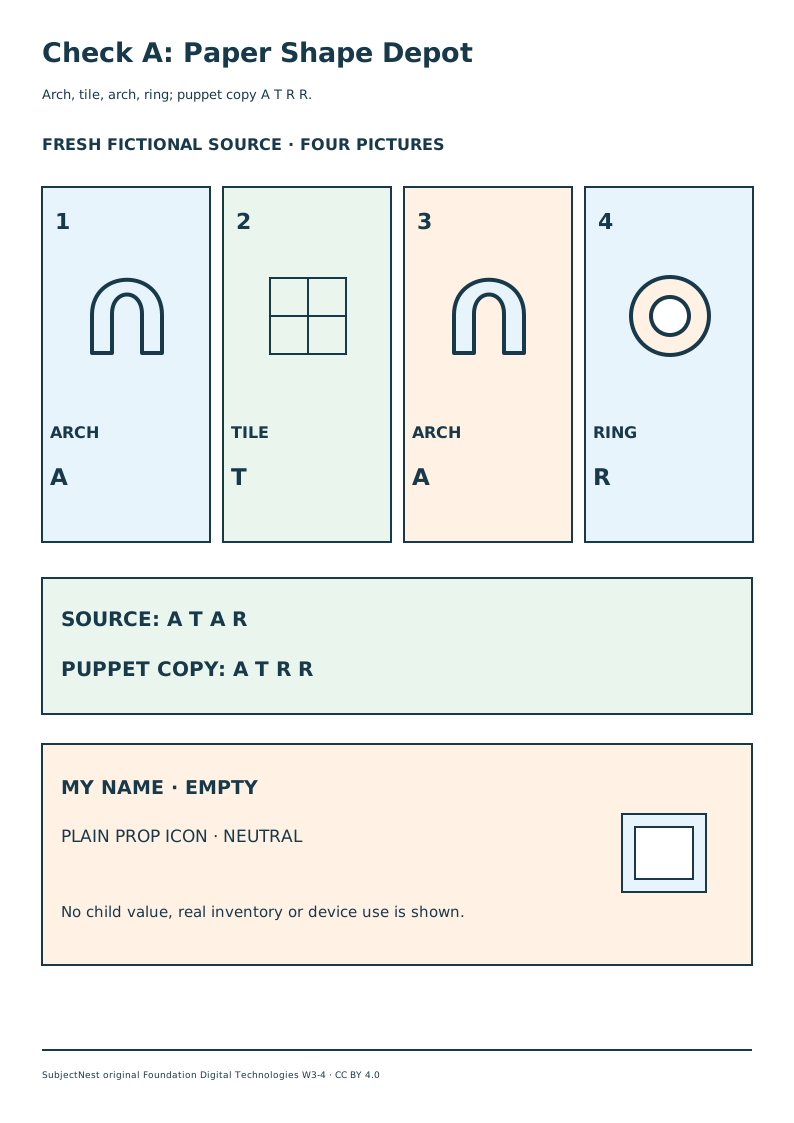
Check A · Paper Shape Depot
Original SVG · A4 PDF. Title: “Check A: Paper Shape Depot.” Subtitle: “Arch, tile, arch, ring; puppet copy A T R R.” Four large numbered picture fields left to right: 1 ARCH (arched opening outline, symbol A); 2 TILE (square divided into four smaller squares, symbol T); 3 ARCH (same arched outline, symbol A); 4 RING (large circle with open circular centre, symbol R). Lower source line SOURCE: A T A R; second line PUPPET COPY: A T R R. Bottom fields: MY NAME · EMPTY and PLAIN PROP ICON · NEUTRAL, with an actual nested-square PANEL pictogram at the right of the neutral label. It says no child value, real inventory or device use is shown. Tactile route: four large source positions with raised arch, gridded square, arch, open ring; two separate four-letter rows; trace the neutral nested-square icon and leave the personal category empty. The student questions are separate.
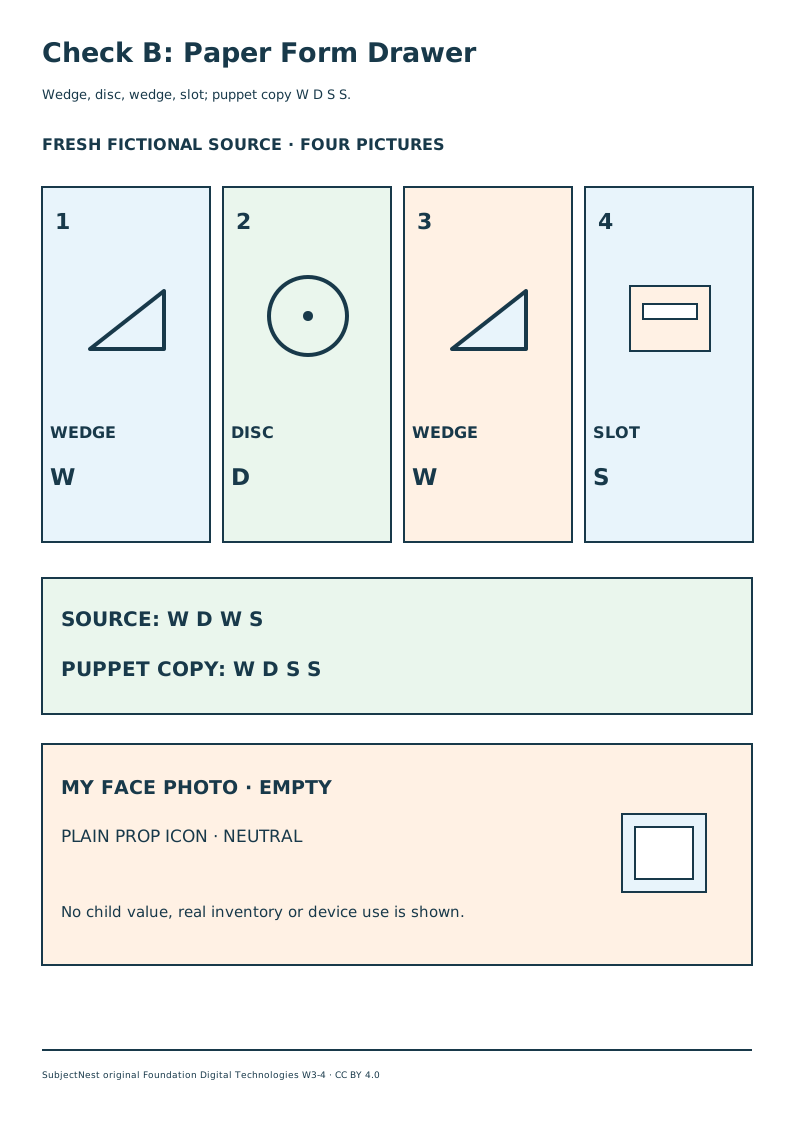
Check B · Paper Form Drawer
Original SVG · A4 PDF. Title: “Check B: Paper Form Drawer.” Subtitle: “Wedge, disc, wedge, slot; puppet copy W D S S.” Four large numbered picture fields left to right: 1 WEDGE (triangular wedge with horizontal base, symbol W); 2 DISC (filled round disc with small central dot, symbol D); 3 WEDGE (same triangular wedge, symbol W); 4 SLOT (rectangular body with a narrow inset slot, symbol S). Lower source line SOURCE: W D W S; second line PUPPET COPY: W D S S. Bottom fields: MY FACE PHOTO · EMPTY and PLAIN PROP ICON · NEUTRAL, with an actual nested-square PANEL pictogram at the right of the neutral label. No child value, real inventory or device use is shown. Tactile route: four large source positions with triangle, round disc, triangle, slot rectangle; two four-letter rows; trace the neutral nested-square icon and leave the personal category empty. The student questions are separate.
Every printed footer credits “SubjectNest original Foundation Digital Technologies W3–4 · CC BY 4.0.” The PDFs embed DejaVu font subsets under the font's separate rights; no standalone font file is distributed. The offline interactive paper route gives the exact source/copy task without a screen and states the device-evidence limit.